


How to Use the 7AZZANI Website Security Scanner: A Complete 2026 Guide
Every website is a target. Misconfigured headers, outdated components, weak TLS, exposed secrets and injection flaws are exploited automatically, at scale, every single day. The good news: you can find these issues before attackers do — in minutes, for free.
This guide walks you through the **7AZZANI Website Security Scanner** end to end: the three scan modes, how to launch a scan, how to read your results, and how to export a board-ready PDF report.
What Is the 7AZZANI Security Scanner?
7AZZANI is a modern web application security scanner that runs **25 specialized engines in parallel** across five domains:
- **Web** — security headers, cookies, CORS, clickjacking, JWT, open redirect, injection (SQLi/XSS/XXE/command/path), CSRF
- **Infrastructure** — TLS/SSL posture, DNS & email security (SPF/DMARC), open ports, SSH hardening
- **Intelligence** — known-CVE matching enriched with **live NVD + EPSS** exploit-prediction data
- **Code & supply chain** — SAST, dependency (SCA) and secret scanning
- **Authenticated testing** — broken access control, session fixation and cookie hardening *behind* a login
Every finding is scored with **CVSS 3.1**, enriched with **EPSS** (the probability it will actually be exploited), and combined into a single, prioritized **AZZANI Risk Score** so you fix what matters first.
The Three Scan Modes
Pick the depth that matches your goal. You can start with Quick and re-run Deep later.
| Mode | Time | Best for | Coverage |
|------|------|----------|----------|
| **Quick** | ~1–2 min | A fast health check before a launch or demo | Headers, TLS, cookies, CVE-by-version, exposed files, core OWASP checks |
| **Standard** | ~3–5 min | Routine pre-release and monthly checks | Quick + crawled active testing (SQLi/XSS/redirect), framework & JS analysis |
| **Deep** | ~10+ min | Pre-audit, pentest prep, full assessment | Standard + advanced injection, subdomain & API discovery, authenticated testing |
Step 1 — Launch a Scan
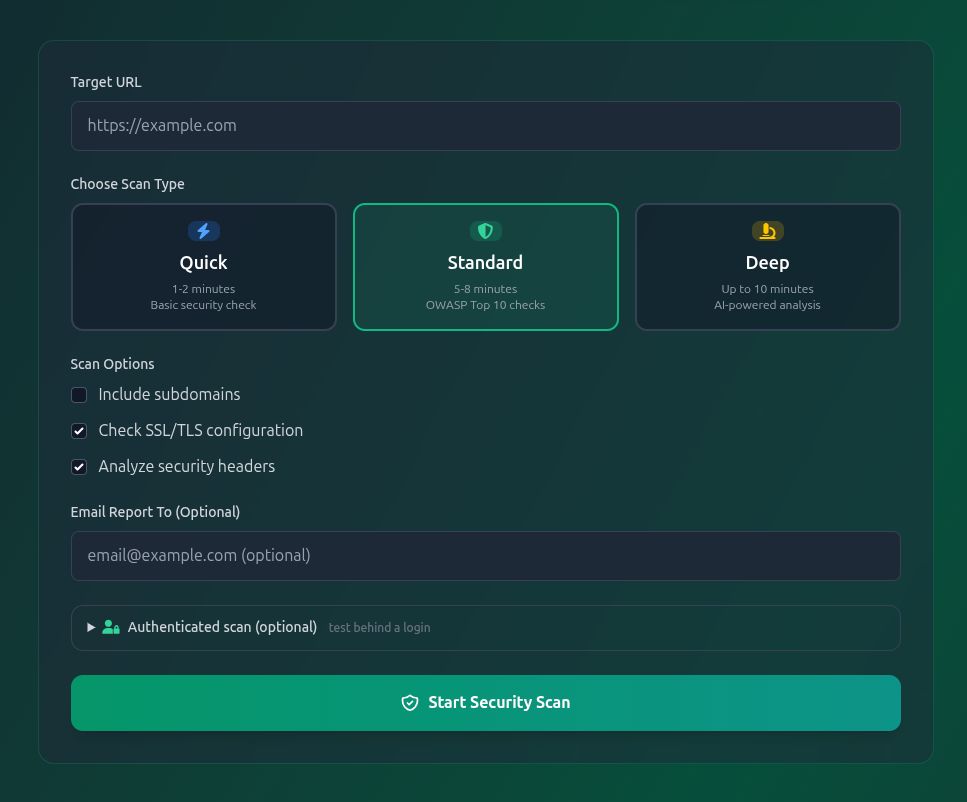
1. Go to **[7azzani.com/scanner](https://7azzani.com/scanner/)**.
2. Enter the full target URL (e.g. `https://yourdomain.com`).
3. Choose **Quick**, **Standard** or **Deep**.
4. *(Optional)* Enter an email address to receive the PDF report automatically.
5. Click **Start Security Scan**.
> ⚠️ **Only scan websites you own or are explicitly authorized to test.**
Step 2 — Watch Live Progress
After you submit, the scan is handed to a dedicated worker so the site stays fast. You'll see, with **no manual refresh**:
1. **Queued** — your position in line and an estimated wait.
2. **Scanning in progress** — a live progress bar and the exact engine running (e.g. *"Security Headers complete (4 findings)"*).
3. **Auto-redirect** to your full report the moment it finishes.
Step 3 — Read Your Results
Your results page groups everything by severity — **Critical, High, Medium, Low, Informational** — and shows:
- **Overall security score & grade (A+ → F)** with a plain-language risk level
- Each finding's **title, affected asset, CVSS score, EPSS, CWE/CVE, and OWASP Top 10 category**
- A clear **recommendation** for every issue
- Technical evidence (request/response, code path, or proof) so your team can reproduce and fix fast
Work top-down: **Critical and High first**, then use the AZZANI Risk Score to prioritize the rest — it weights real-world exploitability, not just theoretical severity.
Step 4 — Export the Professional PDF Report
Click **Download PDF** for a premium, **bilingual (English / Arabic)** report that includes the executive summary, severity breakdown, top risks by AZZANI Score, engine coverage, full findings detail and regulatory alignment (PCI-DSS, ISO 27001, NIST, OWASP ASVS).
If you entered an email when starting the scan, the same PDF is **delivered to your inbox automatically** when the scan completes — perfect for sharing with clients, management or auditors.
Best Practices
- **Run a Quick scan before every release**, a Standard scan monthly, and a Deep scan before audits or pentests.
- **Fix Critical/High within the sprint** — those are the issues attackers reach first.
- **Re-scan after fixes** to confirm remediation and watch your grade climb.
- For real coverage, run an **[authenticated scan](https://7azzani.com/scanner/)** — most serious bugs live behind the login.
FAQ
**Is the 7AZZANI security scanner free?**
Yes — Quick, Standard and Deep scans are available at [7azzani.com/scanner](https://7azzani.com/scanner/).
**How long does a scan take?**
Quick ~1–2 minutes, Standard ~3–5 minutes, Deep ~10+ minutes, depending on site size.
**Does it test the OWASP Top 10?**
Yes — injection, broken access control, security misconfiguration, vulnerable components, cryptographic failures and more are all covered.
**Can I get a report for my client or auditor?**
Yes — export the bilingual PDF, or have it emailed automatically on completion.
---
### Ready to secure your site?
👉 **Run your free scan now: [7azzani.com/scanner](https://7azzani.com/scanner/)**
*7AZZANI — offensive-grade, defensive scanning.*
{# Provenance for articles generated from a source document. Rendered here rather than stored in the body so it stays accurate and cannot be edited away, and so the sealed draft stays purely generated. #}
Discussion 0
No comments yet. Be the first to start the discussion!
Leave a Comment
Comments are reviewed before they appear.
Write a comment